
Bring AnySearch to DeepSeek Harness in Two Commands
AnySearch Now Officially Supports DeepSeek Harness.
Install @anysearch/anysearch-dsh to use AnySearch directly through DeepSeek Harness without changing the existing web_search or web_fetch workflow. The plugin brings real-time web search, URL content extraction and cleaning, vertical search, and batch search capabilities to Harness.
AnySearch is search infrastructure built for AI Agents, covering the public web as well as specialized data sources across code, finance, academic, law, security, and more.
No additional MCP Server deployment is required, and you don't need to configure an API Key before getting started. Two commands are all it takes to begin.
What You Get
- Real-time web search: Use Harness's native
web_searchwith AnySearch to return titles, snippets, and source URLs, helping Agents access up-to-date information, cite sources, and verify results. - URL content extraction and cleaning: Use the native
web_fetchtool with AnySearch Extract to fetch and clean the main content from a specified public HTTP(S) URL for further reading, summarization, and information extraction. - Vertical search: Agents can dynamically discover currently supported search domains, vertical categories, and parameter definitions, then perform vertical searches using tags, regions, languages, and structured parameters based on the task.
- Batch search: Run 1–5 independent searches concurrently. A failure in one search does not affect the others, making it suitable for multi-source research, fact-checking, and other professional research tasks.
Quick Start
For AI Agents
If an AI Agent is helping with installation, have it retrieve the complete installation guide first and follow the instructions in the document:
curl -fsSL https://raw.githubusercontent.com/anysearch-team/anysearch-dsh/refs/heads/main/docs/agent-installation.mdFor Developers
Before getting started, make sure Node.js and pnpm are installed and properly configured in your environment. The same installation commands work on Windows, Linux, and macOS.
Step 1: Install the AnySearch plugin into the web profile
npx -y @deepseek-ai/dsh plugin --profile web add @anysearch/anysearch-dshStep 2: Launch DeepSeek Harness
npx -y @deepseek-ai/dsh web安装完成后,普通联网查询仍然使用 Harness 原生的 web_search,无需改变原来的使用方式。未配置 API Key 时,请求会使用 AnySearch 匿名额度。
Once installed, standard web queries continue to use Harness's native web_search, so there is no need to change your existing workflow. If no API Key is configured, requests will use AnySearch's anonymous usage quota.
Extend DeepSeek Harness Search Capabilities
除 DeepSeek Harness 原生的 web_search 和 web_fetch 外,@anysearch/anysearch-dsh 还提供 3 个扩展搜索工具:
In addition to DeepSeek Harness's native web_search and web_fetch, @anysearch/anysearch-dsh provides three additional search tools:
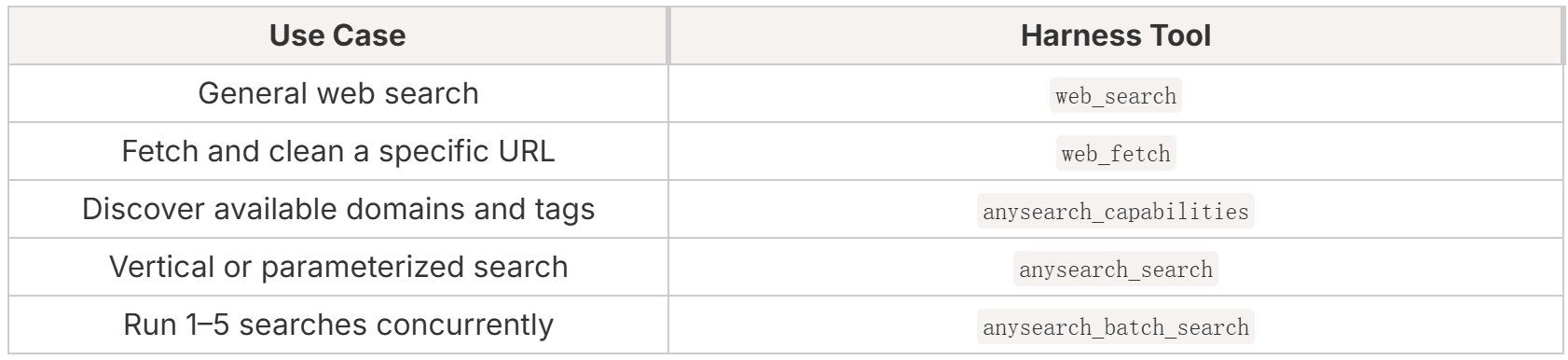
web_search and web_fetch retain the native DeepSeek Harness workflow. The other three tools are provided by the AnySearch plugin to extend Harness with vertical search and search capabilities for more complex research tasks.
1. General Web Search
General web searches continue to use DeepSeek Harness's native web_search.
AnySearch returns titles, snippets, and source URLs, allowing Agents to present search results, cite sources, and further verify information.
When deeper analysis of a specific webpage is required, Harness's native web_fetch can use AnySearch Extract to fetch and clean the main content from a public HTTP(S) URL, making it easier for Agents to analyze and extract information from the page.
2. Vertical Search
For specialized tasks involving code, finance, law, academic, and other domains, Agents do not need to know every supported domain, tag, or parameter in advance.
They can first call anysearch_capabilities to discover currently available domains, vertical categories, and parameter definitions, then dynamically call anysearch_search with tags, regions, languages, and structured parameters based on the task.
Advanced search can also return cleaned page content directly with search results when needed, supporting research tasks that require deeper reading and analysis.
3. Batch Search
Complex Agent tasks often require multiple independent searches at the same time.
anysearch_batch_search can run 1–5 independent searches concurrently. A failure in one search does not affect the others, and results are returned in the same order as the input.
This is useful for competitive research, multi-source fact-checking, technical solution comparisons, Research Agents, and other complex tasks that require parallel search.
Optional API Key Configuration
No API Key is required to get started. After installing the plugin, you can start with the anonymous usage quota provided by AnySearch.
For continued use or higher limits, register for an AnySearch account and configure an API Key. Registered users can receive 1,000 free search calls per day.
API Key configuration: https://www.anysearch.com/console/api-keys
After obtaining your API Key, add it to the credentials file managed by DeepSeek Harness at $DSH_HOME/.credentials.yaml. The default location is ~/.dsh/.credentials.yaml:
ANYSEARCH_API_KEY: "as_sk_your_key"You do not need to restart DeepSeek Harness after configuration. The new credential will take effect on the next request.
Manage the Plugin
Update the plugin:
npx -y @deepseek-ai/dsh plugin --profile web update @anysearch/anysearch-dshRemove the plugin:
npx -y @deepseek-ai/dsh plugin --profile web remove @anysearch/anysearch-dshCompatibility
DeepSeek Harness is currently in developer preview and evolving rapidly. Future releases may introduce incompatible changes, and @anysearch/anysearch-dsh will continue to be updated and adapted accordingly.
@anysearch/anysearch-dsh is now open source on GitHub. We welcome developers to try AnySearch with DeepSeek Harness and submit bugs, compatibility issues, or feature requests through GitHub Issues.
GitHub: https://github.com/anysearch-team/anysearch-dsh
AnySearch:www.anysearch.com